
      Home

      Learn DCP

      On Screen Panel

      Panel Functions

      Settings

      PM Options

      Results Service

      Service Overview

      Service Quick Guide

      Enroling Patients

      Uploading Results

      WebLink Settings

      Media

      Download

      Download DCP

      HeLP Trial Client

      MBS Quick Reference Cheat Sheets

      Support and Licencing

      Support Options

      Licencing

      Feedback

      UseInResearch

      Technical Issues

      Technical Requirements

      Best Practice Jade Configuration

      Sql Connection Debug

      UAC Windows

      App Locker

      Medical Director Specific

      About

      About DCP

      Whats New

      Testimonials

      Links

      Partners

      Blog
Patient Sticky Notes
      Use Cases:

      1. Reminder of pending ....any item.............. that needs to be discussed with patient at next presentation.

      2. Highlight / Point to reminders and tasks buried in the clinical record.

      3. Questions to be asked at next consult

      4. Reminder for salient points from todays discussion

      5. Visual note on something for next visit.

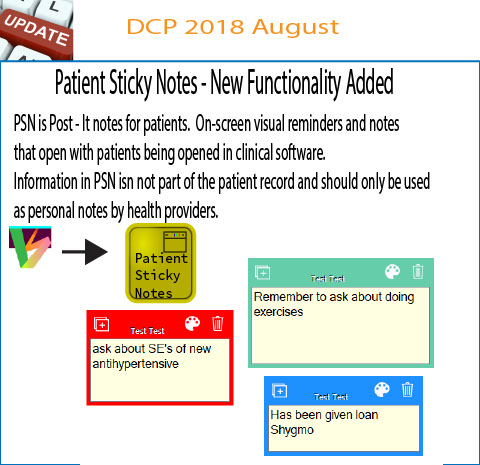
      There are endless use cases.  Sticky notes are highly visual.  With sticky notes running you can be more efficient and effective.

      PSN are not part of patient clinical notes - you can avoid polluting clinical notes with irrelevant notes / jottings / ideas.

      "Post - It Notes" for patients.

      Persists

      1. Position

      2. Colour

      3. Text

      to maximise effectiveness

      Each user has sticky own Sticky Notes for individual patients.
Important information
Patient Sticky notes are to assist detail remembrance outside of clinical record providing a vivid visual reminder.
PSN can be customised with position and colour as well as text.
All medical record relevant information must continue to be stored in patient clinical records.
There is no restore ( undelete ) of deleted sticky notes.

Instructions- Patient Sticky Notes is a separate application from DCP.
      Start Sticky Notes from DCP Functions panel (will install if not already installed)

      Use the 'New Sticky Note' Button to create a note for the current patient open in clinical software.
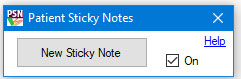
Start Sticky Notes from DCP Functions panel (will install if not already installed)
Use the 'New Sticky Note' Button to create a note for the current patient open in clinical software.
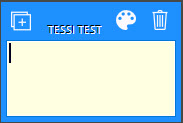
      Type into the sticky note.  Use the palette to set colour and bin to to delete.

      Plus sign at top left to add another sticky note.
Tracking patients in clinical software
Each patient will have their own set of sticky notes.
Notes will switch to the current patients notes with change of patient in clinical software.
Notes will come to the foreground when patient changes (but will not take input focus away from clinical sofware).
To send notes to the background, click on a note then click anywhere on clinical sofware.
      Terms of use

      Privacy Statement

      Copyright © 2019 Doctors Control Panel Services